

Task Assignment Documentation
The Task Assignment feature allows banks to delegate specific tasks to various stakeholders involved in the loan origination process. Tasks can be assigned to clients, legal professionals, or internal users (such as credit officers or administrators), ensuring that all necessary actions are distributed effectively across the right participants.
Key Elements of Task Assignment
Task Assignment Icon
- Definition: The task assignment icon is located at the bottom right corner of any application screen.
- Appearance: It is represented by a task-specific icon, making it easily identifiable during the loan process.
- Function: Clicking on the task icon opens a popover menu where the user can assign tasks.
Task Assignment Popover
- Definition: The popover is a compact menu that appears when the task icon is clicked. This menu allows users to select the appropriate participant and task to assign.
- Components:
- Participant Selection: A dropdown or selection field where users can choose the participant (stakeholder) responsible for the task. Participants can include:
- Client: The individual applying for the loan.
- Legal Professionals: Lawyers or other external legal stakeholders.
- Internal Users: Bank employees, such as credit officers, who need to complete tasks as part of the review process.
- Task Registry: A list of predefined tasks available for assignment. Tasks in the registry could include:
- Document submission (for the client)
- Contract review (for legal professionals)
- Loan approval (for internal users)
- Participant Selection: A dropdown or selection field where users can choose the participant (stakeholder) responsible for the task. Participants can include:
Selecting a Participant
- Definition: Choose a participant from the dropdown list based on the task to be assigned.
- Purpose: Assign the task to the appropriate stakeholder based on their role in the loan process.
- Example: If a legal document needs to be reviewed, the participant could be assigned as the legal professional responsible for that action.
Selecting a Task
- Definition: Choose a task from the task registry that corresponds to the action that needs to be completed by the selected participant.
- Purpose: Ensure the correct task is assigned to the appropriate stakeholder. Each task is predefined in the task registry to maintain consistency across the process.
- Example: A client may be assigned a task to submit identification documents, while an internal user may be assigned a task to approve loan terms.
Task Completion Tracking
- Functionality: Once a task is assigned, it can be tracked within the system to ensure completion. Notifications may be sent to the participant, and their progress can be monitored by internal users.
Steps to Assign a Task:
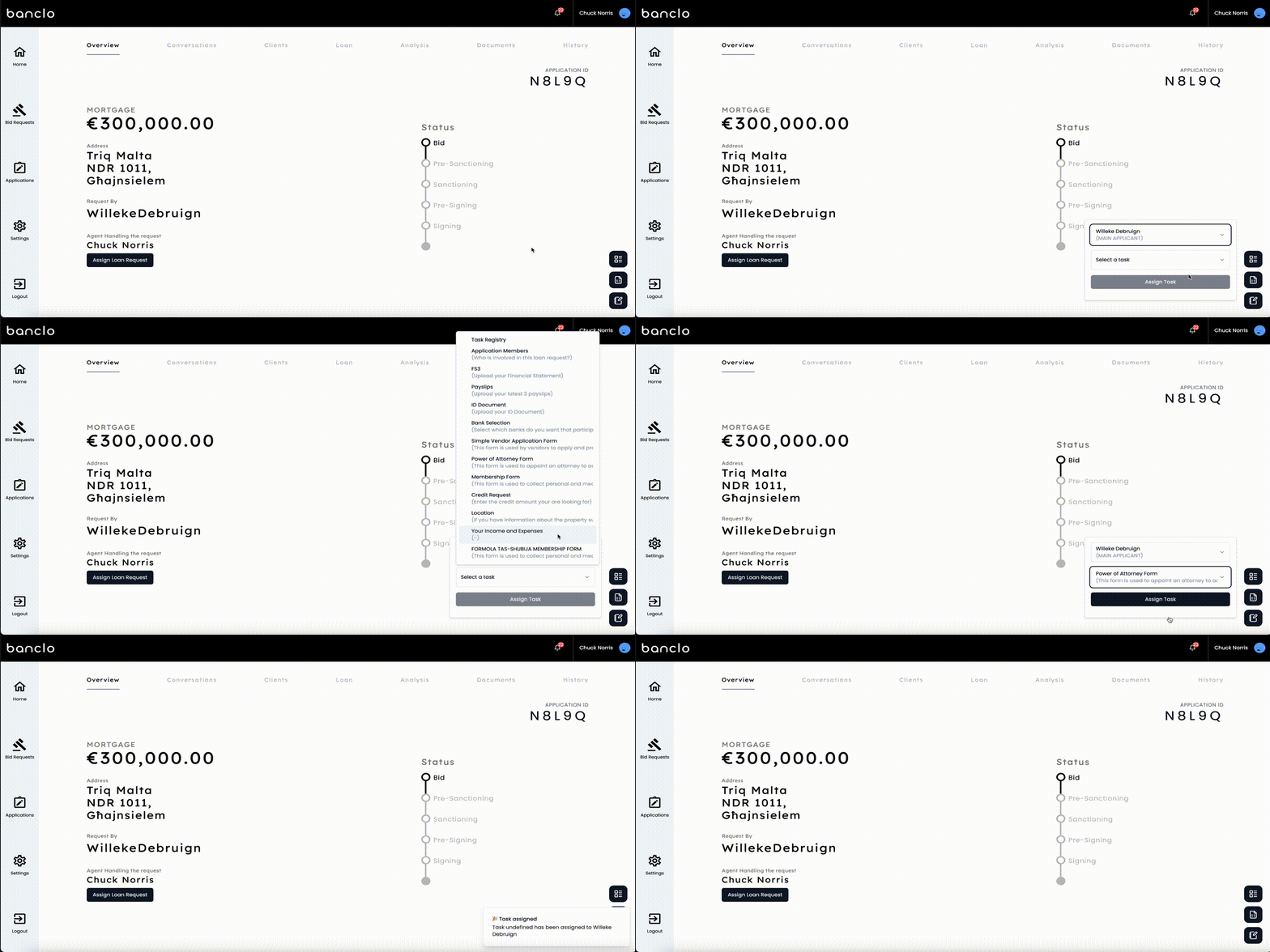
Click the Task Assignment Icon: Navigate to the bottom right of the application screen and click on the task icon.
Select a Participant: Choose the relevant stakeholder from the popover dropdown (e.g., Client, Legal Professional, Internal User).
Select a Task: From the task registry, choose the appropriate task that the participant will be responsible for.
Submit the Task: After selecting the participant and task, confirm the task assignment to notify the participant and begin tracking their progress.
Conclusion
The Task Assignment feature ensures that all stakeholders involved in the loan origination process are efficiently assigned tasks. By leveraging the task icon and popover menu, bank staff can quickly and easily delegate actions to the appropriate users, whether they are clients, legal professionals, or internal employees. This feature supports a streamlined and organized workflow, with task progress tracked throughout the loan process.